Retro
TeamSpeak Generation [version 1.1-alpha]
Copyright Retro Spection 2026. All Rights Reserved.T:\Users\TeamSpeak\TeamSpeak3>
exec ts3_in_details
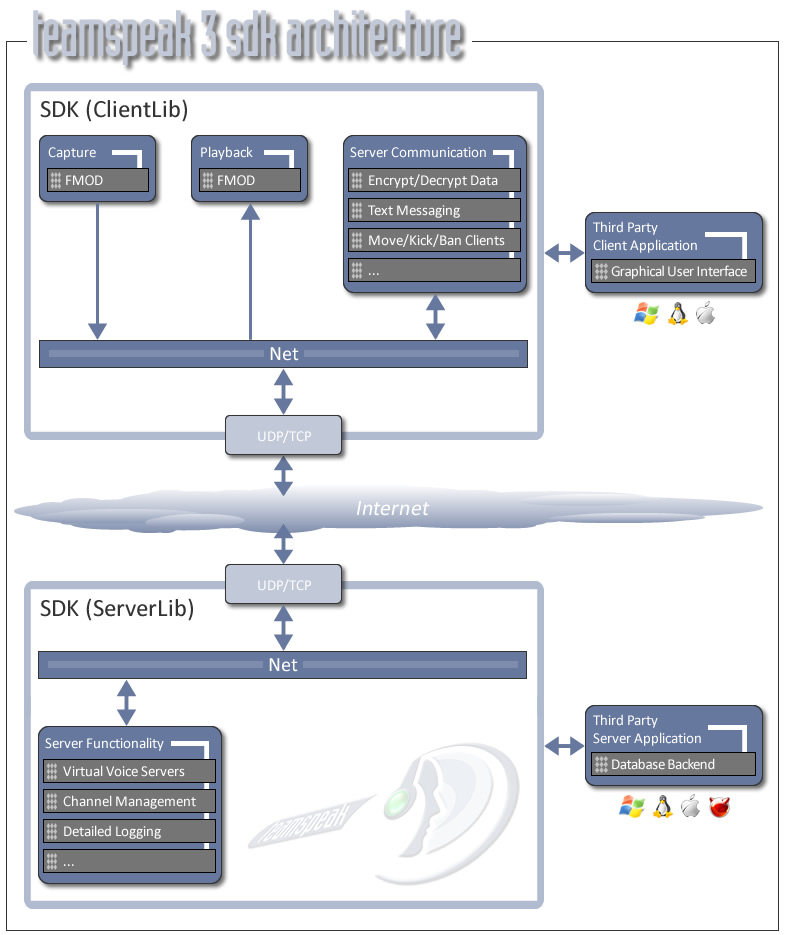
TeamSpeak 3 Architecture in Detail
TeamSpeak 3 is a complete re-write of the product from the
ground up. Previous versions of
TeamSpeak were written in
Pascal, a much older programming language with many limitations.
In contrast, TeamSpeak 3 is written in C++ and not only
introduces a completely new SDK based
architecture, but right
from it's initial release to the public has also introduced
cross-platform support
for both client and server for Windows,
Linux and Macintosh platforms. This was not easy feat
which is
one of the reasons the dev team choose to take the added time to
make certain that
TeamSpeak 3 is everything users and customers
have come to expect in a quality VoIP product.
Also, keep in mind
TeamSpeak 3 intriduces many new features as well as tackles many
previous
challenges in terms of scalability, compatibility, and
of course superior voice quality.
-
The Graphical User Interface (Qt) is the main TeamSpeak 3
client application, similar to what
you used in TeamSpeak 2.
However, TeamSpeak 3 natively support Macintosh, Linux and
Windows platforms.
-
TeamSpeak 3 features support for powerful LUA Script (scripting
language). Consequently,
the "Console User Interface"
users and developers are capable of shaping the TeamSpeak
client
into just about anything they can imagine.
-
"Telnet" and "Scripts / Programs, Third Party,
Web Interface" all use a new powerful server
query
interface similar to TeamSpeak 2's TCP Query, but much more
powerful. In addition,
the web interface is now an external PHP
application which can be used to manage a
TeamSpeak server via
web browser.
-
"ClientLib/SDK" is a library (dll/so) which makes it
possible to interact with the server by
using a simple
application programming interface (API). So, it provides
developers with the
possibility to for example connect to a
server, mute the microphone, or switch channels. The
"Capture/Playback/Input" components provide a plugin
system which further allow
developers to for example write your
own playback plugin which streams the output to a
Shoutcast
server in addition to playing it back.
-
TeamSpeak 3 allow you to use either TCP or UDP protocols for
client connectivity. Support
for TCP connectivity is
particularly useful for circumstances where people need to use
proxies,
or where UDP is completely blocked due to corporate
firewalls, etc.
-
The TeamSpeak 3 server supports a database plugin system so for
example, developers can
now write their own plugin for a
completely proprietary database if they so desire. The server
components are also available as a library version which
developers can also include into their
own application.
TeamSpeak 3 Authentication System
TeamSpeak 2 (and many other systems) use a username/password
based authentication system.
Each user is identified by a unique
username but must also supply the correct password to be able to
claim the username and permissions associated with it. TeamSpeak
3 uses a public/private key
authentication system. It basically
creates an "identity" file on it's first start-up
which contains a
public and a private key, when connecting to a
server it sends the public key and proves through a
cryptographic protocol that it also must have a matching private
key (without actually sending
the private key).
If you are
having problems understanding this concept think of the public
key as a randomly
generated user name (which is guaranteed to be
unique in the whole world due to it's length), and the
private
key as kind of password but wrapped in some clever math to avoid
to ever having to send the
actual private key to the server.
+ Since you pick username and password you hopefully will be
able
to memorize this data. This allows you to access your
account from anywhere in the world, using the
information stored
in your head to pass authentication and hence gain access to
your privileges.
+ Username/password authentication is the most used
authentication scheme out there, so users
should have an easier
time understanding the concept.
- Passwords chosen are often very weak and/or used in other
places. One compromised password of
a server admin is usually
enough to totally ruin the gaming experience of all members of
the affected
TeamSpeak server for a couple of days, not even
talking about wasting time precious time with
threads like
"omg we have been h4xx0red!!1!!1!".
This issue is
especially true for TeamSpeak (opposed to other
username/password systems out there
because):
It's "just for gaming", many people don't give a
second thought about choosing a good
password or chosing one you
didn't use on ten shady websites already.
Many users of TeamSpeak also might be very young and might
not have thought about the
topic of password security.
+ Since public and private key are generated randomly (and
are much longer than the usual username
or password) they are
virtually impossible to get at, they contain no pattern that can
be exploited and
the length prohibits any brute force attack.
Even eaves dropping onto a client as he connects to a
server
(man in the middle attack) will NOT gain you any insight.
+ As there is no need to manually pick a username and
password the whole registration step of
username/password based
systems is no longer necessary. This makes the system easier and
more
intuitive to use as you just connect and the server
automatically recognizes you.
- If you want to use your account from a different computer
or after reinstalling your computer you
cannot use your head
only to authenticate (nobody remembers public+private key), so
you need to
remember to export your identity and bring it along.
Conclusion:
TeamSpeak 3 uses state of the art cryptography for
authentication, making a huge leap security wise
as compared
with TeamSpeak 2. There are some minor hassles when switching
computers
(export identity), but this is a task most users will
not need to do at all and is no big deal usually even
when
forgotten.
Sourced From: teamspeak.com
|
|
|
 Go_Back